
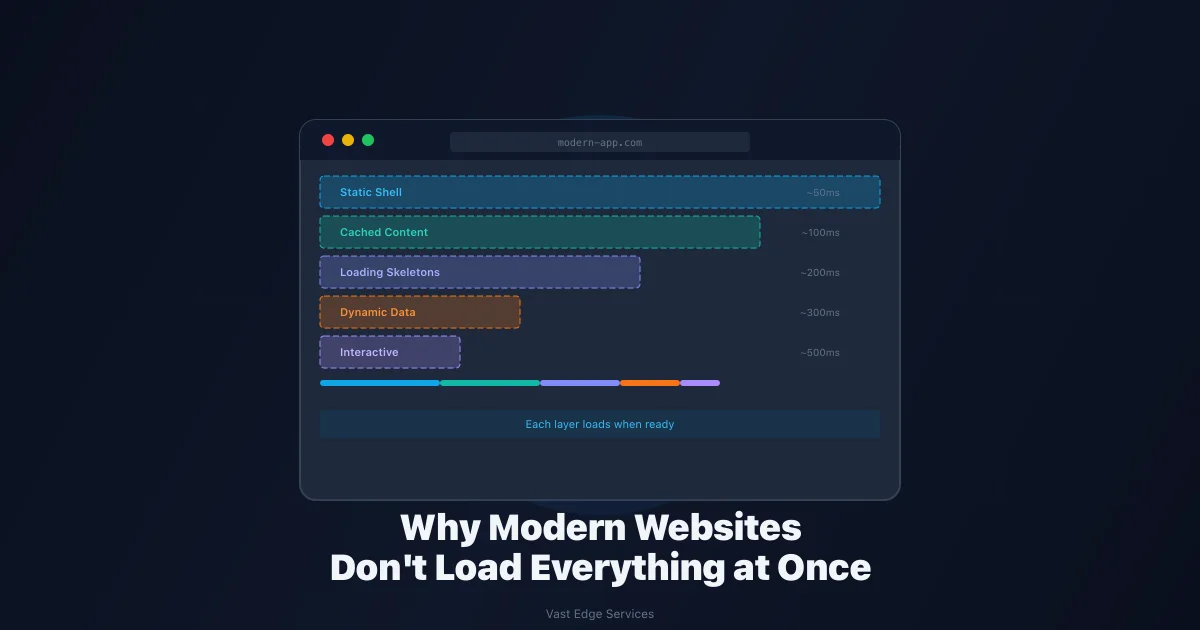
Most people imagine a website as a single page that loads all at once. You click a link, the browser waits, and then the entire page appears.
That mental model used to be accurate. For years, web pages were built as one unit. The server would prepare everything — the layout, the content, the data, the scripts — and send it all together. The browser would wait until it had the complete package before showing anything.
Modern websites and apps rarely work this way anymore. A dashboard or client portal might include a static header, cached navigation, service content, user-specific account data, analytics cards, notifications, forms, and live status sections. Loading all of that at once would be slow and wasteful.
Instead, modern pages load in layers. Some content is ready immediately. Some is cached. Some data is dynamic. Some parts become interactive only in the browser. The result is a page that feels fast because the user sees meaningful content early, even if slower parts are still loading.
The Old Way: One Big Page
In the traditional model, the whole page waits together. A single slow database query, API call, or image load can delay the full experience. The browser shows nothing until everything is ready.
This created a frustrating tradeoff. Developers had to choose between fully static pages (fast but inflexible) and fully dynamic pages (flexible but slow). A page could feel sluggish even if only one small section needed fresh data.
The user experience suffered most on complex pages. A dashboard with six widgets would block on the slowest one. A product page with a live inventory check would hold back the entire layout. The page existed as a single unit, and everything waited on the slowest part.
The Modern Way: Pages Built in Layers
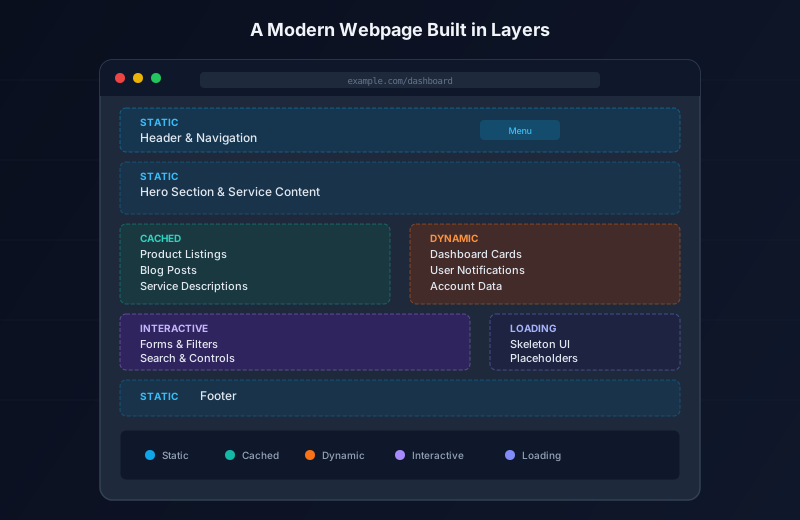
Modern web frameworks and rendering strategies treat a page as a collection of independent sections, not a single block. Each section can be handled differently based on how it changes, who needs it, and how fast it should appear.
A typical modern page might include:
- Static sections that never change between requests (headers, footers, layout)
- Cached sections that change occasionally but can be reused (blog posts, product listings, service descriptions)
- Dynamic sections that need fresh or user-specific data (notifications, account info, cart contents)
- Interactive sections that respond to user input (forms, filters, search bars)
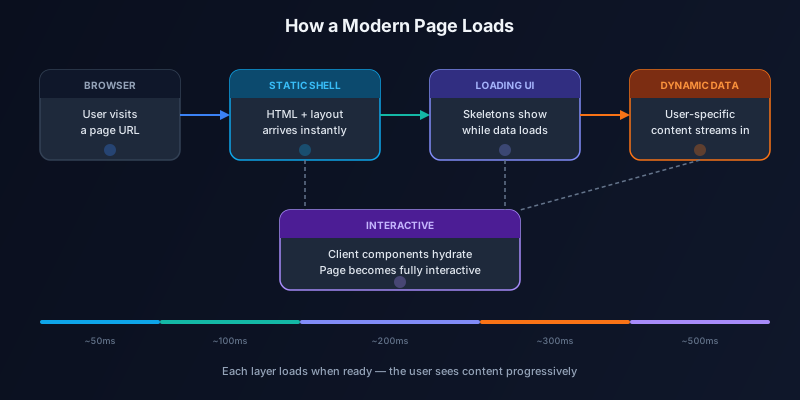
Each layer loads independently. The user sees the static shell immediately, then watches the page fill in as other layers arrive.
Static Content Can Show Up First
Not every part of a page changes often. Headers, navigation, hero sections, service descriptions, blog content, and footers can often be served quickly because they are the same for every visitor.
This is the foundation of perceived speed. When a user visits a page and sees the layout, branding, and core content within milliseconds, the page feels fast — even if personalized sections are still loading. The brain registers "the page is here" before it registers "some parts are still loading."
Static content can be served from a CDN, pre-rendered at build time, or cached at the edge. The exact method depends on the project, but the principle is consistent: ship the stable parts first.
Dynamic Sections Can Load Separately
Some sections need fresh or user-specific data. Notifications, dashboard cards, account information, cart details, booking status, and analytics all depend on data that changes per user or per request.
In the old model, these sections would block the entire page. In the modern approach, they load independently. The page renders a placeholder or skeleton while the dynamic data arrives, then swaps in the real content.
This means a user can start reading a blog post, scanning a product page, or navigating a dashboard while their personalized data loads in the background. The page does not wait on the slowest dynamic section.
Loading States Are Part of the Experience
Loading UI is not just decoration. It communicates that work is happening. A skeleton placeholder, a shimmer effect, or a small loading indicator tells the user that the page is responding and their content is on the way.
Good loading states make products feel calmer and more stable. The user does not wonder if the page is broken — they see visual feedback that progress is happening. Bad loading states, or no loading states at all, make even a fast app feel broken. A blank area or a frozen layout creates uncertainty.
The best loading states are specific to the content they replace. A skeleton that matches the shape of a card list feels intentional. A generic spinner over an entire page feels like a workaround.
Caching Changes the Feel of Speed
Some data does not need to be fetched from scratch every time. A company's service descriptions, a blog post, a product catalog — these things change occasionally, but not on every request. Fetching them fresh every time is wasted work.
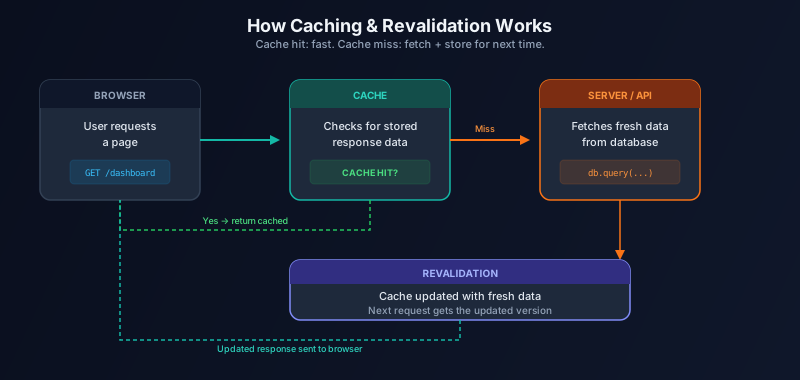
Caching stores the result of a previous request so future visitors get it faster. When someone visits a page, the server (or CDN) checks whether it already has a recent version of the data. If it does, that cached version is served immediately. If it does not, the data is fetched, stored, and then served.
Revalidation adds an important layer. Cached data can be set to expire after a certain time or refreshed on demand. This balances speed with freshness. A product page might cache its content for an hour, ensuring fast loads for most visitors while staying reasonably current.
The practical effect is significant. Pages that rely on cached content can load in under 100 milliseconds on repeat visits. Without caching, the same page might take 500 milliseconds or more on every single visit.
Server Components vs Client Components
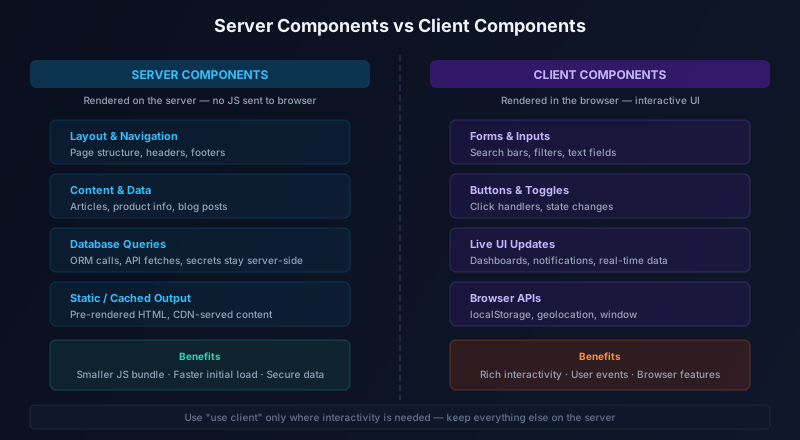
Not all UI needs to run in the browser. Some components render on the server, where they can access databases, read files, and use API keys without exposing them to the client. Others need browser interactivity — state management, event handlers, user input.
Server Components render on the server and send their output to the browser as HTML. They do not add JavaScript to the client bundle, which keeps page loads fast. Content-heavy components — articles, product listings, layout sections — are good candidates for Server Components.
Client Components handle interactivity. Forms, search bars, toggle buttons, live dashboards, and any UI that responds to user events need to run in the browser. These components are marked with the "use client" directive in frameworks like Next.js.
The split matters because every Client Component adds JavaScript to the bundle. Too much client-side code slows down initial page loads. Too much server-side rendering without client components makes interactive features impossible. The right balance depends on what each section of the page actually needs.
Where Next.js Fits
Next.js is one framework that implements many of these patterns through its App Router. It supports Server Components and Client Components natively, provides file-based loading states with loading.js, handles data fetching with built-in caching and revalidation, and offers rendering patterns like Partial Prerendering.
Partial Prerendering (PPR) is a rendering approach where the static shell of a page is pre-rendered at build time, and dynamic sections stream in at request time. The static parts are served instantly from a CDN, while the dynamic parts load behind Suspense boundaries with loading fallbacks. PPR is available in Next.js as a stable feature with the App Router.
It is worth noting that architecture decisions depend on the project. A simple marketing site does not need the same complexity as a multi-user dashboard. A content-heavy blog benefits from different patterns than a real-time booking system. The goal is not to use every available feature — it is to choose the patterns that fit the problem.
What This Means for Business Websites
The practical benefits of layered loading apply across different types of web projects:
A company website with mostly static pages benefits from pre-rendering and caching. Pages load fast, feel stable, and require minimal server resources.
A client portal with user-specific data benefits from the server/client split. The layout and shared content load instantly, while personalized data streams in behind loading states.
An admin dashboard with live metrics benefits from a mix of cached summaries and real-time client components. Historical data loads fast, while live charts update without full page refreshes.
An ecommerce page benefits from cached product content and dynamic cart/account sections. The product description is available immediately, while inventory and pricing update as needed.
A booking or request system benefits from streaming. The form structure loads right away, while status updates and confirmation data arrive when ready.
The common thread is faster perceived loading, clearer structure, and fewer unnecessary waits. Users do not care about the technical details. They care that the page feels responsive and their content appears quickly.
Common Mistakes
A few patterns reduce the benefit of layered loading:
Making the whole page dynamic when only one section needs fresh data. If most of the page is the same for every visitor, rendering it dynamically adds latency without adding value.
Ignoring loading states. A page that goes from blank to fully loaded with no feedback feels slower than a page that shows content progressively, even if the total load time is identical.
Fetching the same data repeatedly. If multiple components need the same information, fetching it once and sharing it is more efficient than each component making its own request.
Putting too much logic on the client. Excessive client-side JavaScript slows initial page loads, increases bundle size, and wastes battery on mobile devices.
Overengineering a simple static site. Not every project needs server components, streaming, and caching layers. A simple static site with good hosting can be fast without complex architecture.
Treating speed as only a design problem. Performance is an engineering decision, not just a visual one. Layout, component structure, data fetching strategy, and caching all affect how fast a page feels.
Using new framework features just because they are trendy. Every pattern has tradeoffs. Choose the ones that match your project's actual needs.
Final Thoughts
Modern websites often feel fast because they are planned in layers. The static shell arrives first. Cached content fills in quickly. Dynamic sections stream behind loading states. Interactive components hydrate when needed.
The goal is not to use every new framework feature. The goal is to decide which parts should be static, dynamic, cached, interactive, or loading separately. That decision is what makes the difference between a page that feels instant and one that makes users wait.
At Vast Edge Services, we focus on practical software and web app decisions that fit real workflows, not just trend-driven tech choices. If you are planning a web project and want to understand what architecture fits your needs, get in touch.